
Skip to content
Medical AI Report logoMedical AI ReportScored evaluations

2 of 11 categories · Updated October 2026

MDCalc review

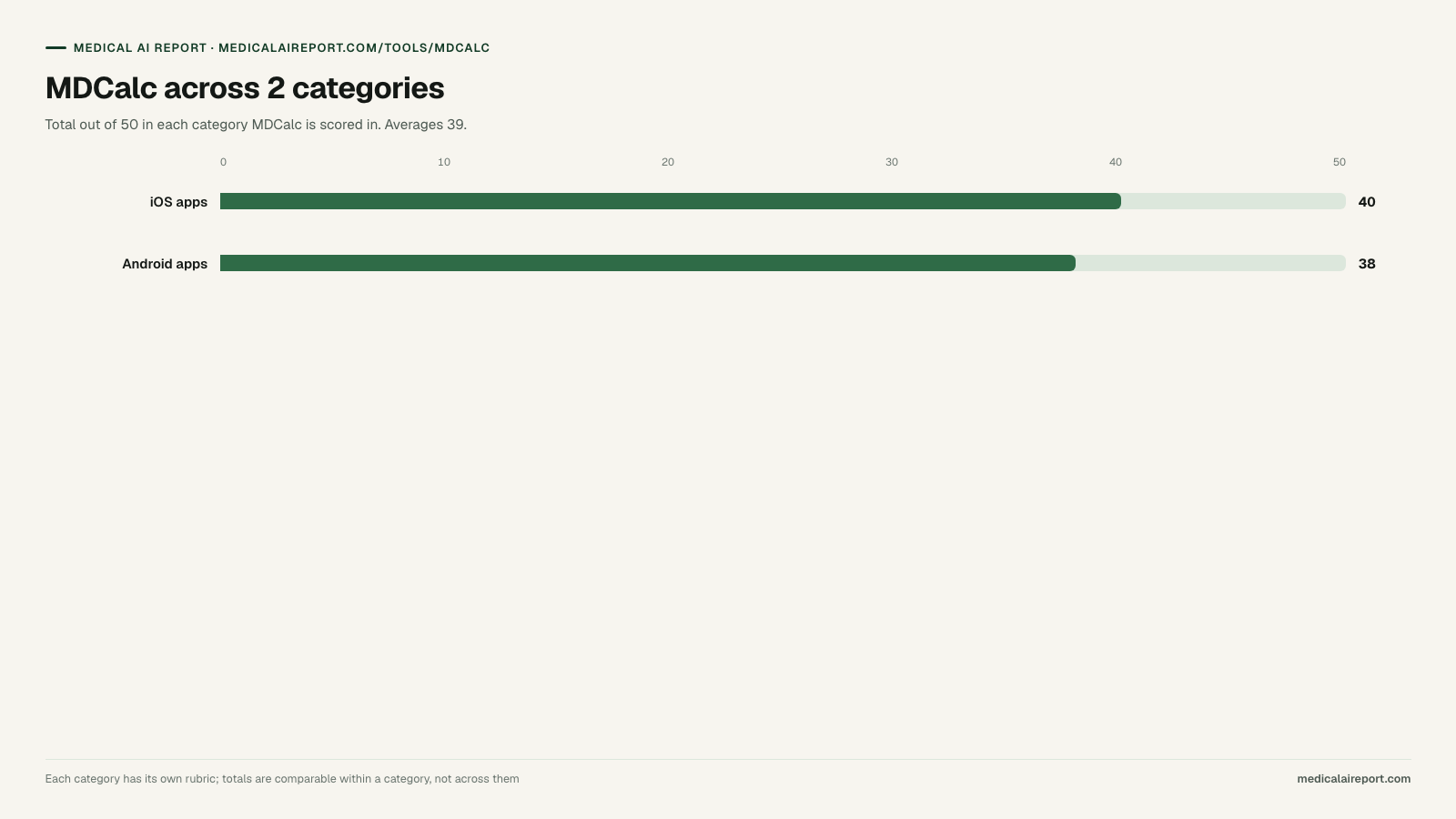
MDCalc is scored in 2 of the 11 categories on this site. Its best result is 40/50 for iOS apps for doctors and its weakest is 38/50 for Android apps for doctors, averaging 39. It does not rank first in any category scored here.

Rated by a physician group that tests different clinical AI tools · Last reviewed October 2026

Best score
40/50
Average
39/50
Categories
2
Ranked first
0

The scores

How is MDCalc scored in each category?

Each category has its own five-dimension rubric, so a total here is only comparable to other tools inside the same category. Every dimension is worth 10 points.

MDCalc across 2 categories. Bar chart: iOS apps 40, Android apps 38, out of 50.
MDCalc's total score in every category it appears in. A highlighted bar marks a category it ranks first in.
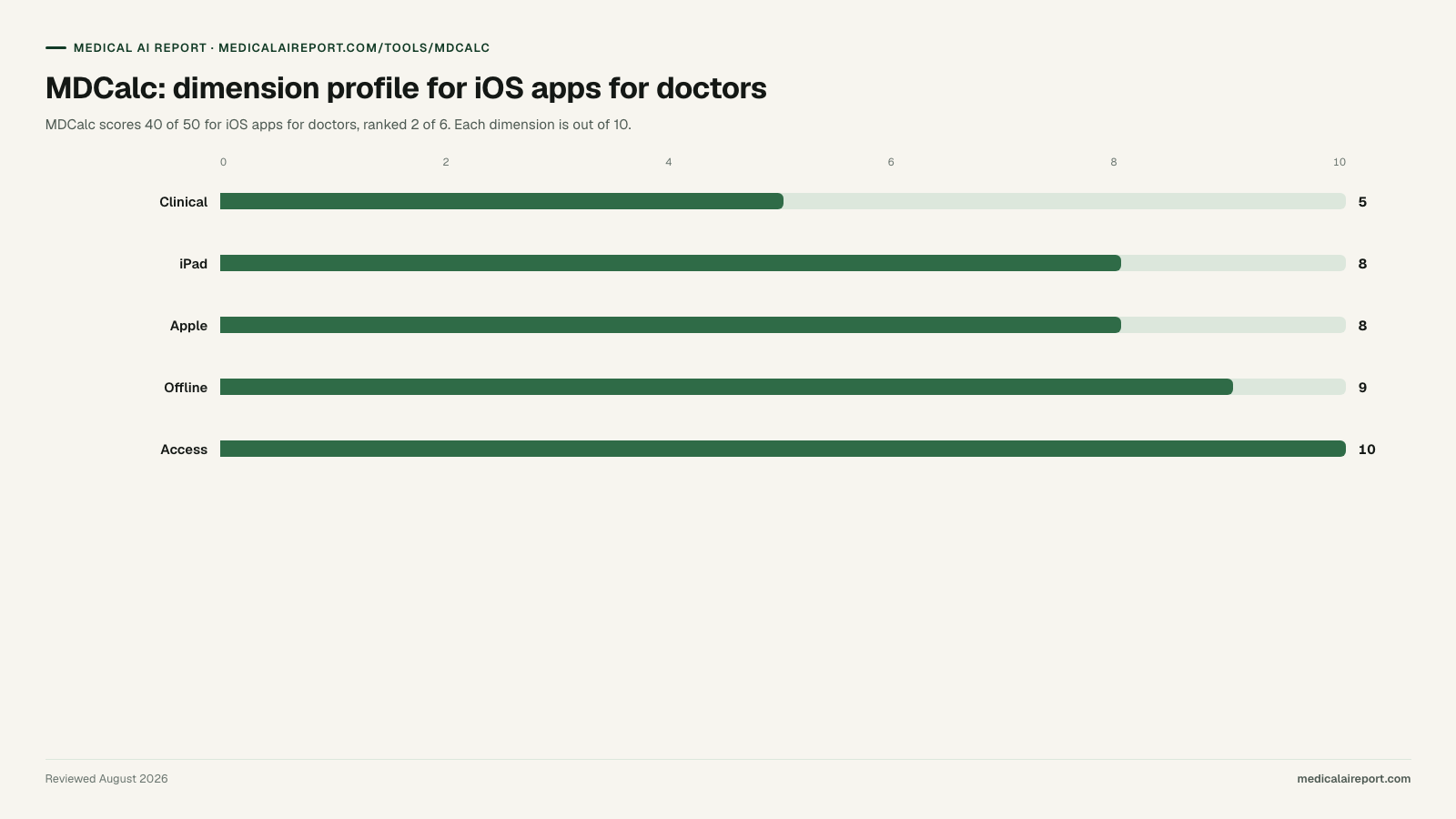
MDCalc: dimension profile for iOS apps for doctors. Bar chart: Clinical 5, iPad 8, Apple 8, Offline 9, Access 10, out of 10.
MDCalc's dimension scores in iOS apps for doctors, its strongest category on this site.

Best clinical calculator app on iOS

40/50

2nd of 6

MDCalc dimension scores for iOS apps for doctors
Clinical scope & reasoningiPhone & iPad experienceApple platform integrationOffline & on-device privacyAccess & eligibility
5/108/108/109/1010/10
Best for
Any clinician who needs a validated score at the bedside. Roughly 700 calculators, each with the original paper, the creator's own commentary and the caveats that decide whether the score applies — and it works with no signal.
Limitation
Deliberately single-purpose: it computes scores and does not answer questions, draft notes or reason about a case, which is why it scores 5 out of 10 on clinical scope despite being the best app on this page at its own job.
Price
Free; optional CME subscription

Dimension-by-dimension rubric criteria for iOS apps for doctors

  1. Clinical scope & reasoning5/10

    Category high: 10/10

    How much of the clinical job the app does, and whether it reasons or only retrieves. A single-purpose reference scores lower here than a tool that carries a case from question to differential to note, regardless of how good it is at its one job.

  2. iPhone & iPad experience8/10

    Category high: 9/10

    Whether the iPad build is a real tablet layout rather than a stretched phone app: multi-column reading, Split View and Stage Manager behaviour, one-handed iPhone reach, and typography you can read at arm's length on a ward round.

  3. Apple platform integration8/10

    Category high: 8/10

    Use of what iOS actually offers: on-device dictation quality, Shortcuts and widgets, Handoff between iPhone and Mac, Apple Watch presence, Face ID locking and Universal Search.

  4. Offline & on-device privacy9/10

    Category high: 9/10

    What still works in a basement reading room with no signal, how much content is stored locally, and whether protected health information stays on the device or is discarded after processing.

  5. Access & eligibility10/10

    Category high: 10/10

    Who can actually install and use it, weighted as heavily as what it costs: App Store and in-app subscription price, the size of the free tier, and the gates in front of it — clinician-verification requirements, country availability and language coverage. An app that is free but closed to most of the world's clinicians scores below a paid app anyone can buy.

Best clinical calculator app on Android

38/50

2nd of 6

MDCalc dimension scores for Android apps for doctors
Clinical scope & reasoningAndroid build qualityEnterprise & device managementOffline & storageAccess & eligibility
5/108/106/109/1010/10
Best for
Bedside scores that have to work every time: roughly 700 validated calculators with the source paper and the creator's caveats attached, running locally so coverage never matters.
Limitation
Single-purpose by design — it computes scores and nothing else, hence 5 out of 10 on clinical scope — and it offers little for IT teams deploying through managed Google Play beyond a standard install.
Price
Free; optional CME subscription

Dimension-by-dimension rubric criteria for Android apps for doctors

  1. Clinical scope & reasoning5/10

    Category high: 10/10

    How much of the clinical job the app does, and whether it reasons or only retrieves. Single-purpose references score lower here regardless of how good they are at their one job.

  2. Android build quality8/10

    Category high: 8/10

    Whether the Android app is maintained at parity with the iOS one: current Material design, adaptive layouts for tablets and foldables, back-gesture and notification behaviour, and how recently it shipped a real update rather than a compatibility bump.

  3. Enterprise & device management6/10

    Category high: 8/10

    Deployability on hospital-owned hardware: Android Enterprise work profiles, managed Google Play distribution, MDM and Samsung Knox compatibility, SSO, and a BAA that covers the mobile client.

  4. Offline & storage9/10

    Category high: 10/10

    How much content lives on the device, whether it can be stored on external storage, and what remains usable with no connection — a decision factor on shared ward hardware with patchy coverage.

  5. Access & eligibility10/10

    Category high: 10/10

    Who can actually install and use it, weighted as heavily as what it costs: Google Play price and subscription cost, free tier size, and the gates in front of it — clinician-verification requirements, country availability and language coverage. This carries particular weight on Android, whose install base is overwhelmingly outside the United States.

Field context

How MDCalc stacks up against the full ios apps field

In iOS apps for doctors, MDCalc places 2nd of 6 tools with 40/50. Its commercial model is classified as free, funded elsewhere (Free; optional CME subscription). Usually advertising or a platform strategy. Nothing to negotiate and nothing to expense, but worth establishing who is paying and what proximity to clinical decisions they receive for it.

Full iOS apps for doctors leaderboard showing how MDCalc compares with all 6 tools in the category. Each dimension is scored out of 10, for a maximum of 50.
ToolClinicaliPadAppleOfflineAccessTotal
EvidenceMD108771042
MDCalc58891040
UpToDate7989336
Doximity8886434
Medscape5766933
Epocrates4778632

Pattern

Where MDCalc wins and where it loses

Full marks

  • Access & eligibilityiOS apps10/10
  • Access & eligibilityAndroid apps10/10

Weakest dimensions

  • Clinical scope & reasoningiOS apps5/10
  • Clinical scope & reasoningAndroid apps5/10
  • Enterprise & device managementAndroid apps6/10

Limits

What this review cannot tell you

This page aggregates scores from the category rubrics. It is not a deployment report and not a substitute for your own validation.

Scores measure documented capability, not outcomes in your clinic. MDCalc has not been tested here against live patient data, and no score on this page reflects implementation quality, support responsiveness or contracted uptime. This rubric scores the iOS build specifically, so an app with a weaker iPhone experience can rank below a lesser product with a better one; scores are not transferable to the same vendor's web or Android version, which we score separately. Access is scored as eligibility and not only as price, which means an app that costs nothing but admits only verified US clinicians ranks below a paid app any clinician can buy — a US physician who clears that gate should re-rank by the other four dimensions, where Doximity scores 8, 8, 8 and 6. Clinical scope is weighted heavily, which penalises excellent single-purpose apps — MDCalc and Epocrates are both stronger at their one job than their totals suggest, and a reader who wants only a calculator should read MDCalc as the winner. App Store pricing, iOS version requirements and feature availability change without notice; verify current terms in the App Store listing. No app here is a diagnostic device, and none replaces your institution's EHR companion app for chart access.

Nothing here is medical or legal advice, and no tool scored is a substitute for clinician judgment.

Common questions

Common questions about MDCalc

What does MDCalc score?

MDCalc is scored in 2 of the 11 categories on this site. Its best result is 40/50 for iOS apps for doctors and its weakest is 38/50 for Android apps for doctors, averaging 39. It does not rank first in any category scored here. Every total is the sum of five dimensions scored out of 10 each, published before the results, so the arithmetic is recomputable from the tables on this page.

What is MDCalc best at?

MDCalc takes full marks on access & eligibility. Its highest total is 40/50 for iOS apps for doctors, where it ranks 2nd of 6 tools scored.

What are the limitations of MDCalc?

Deliberately single-purpose: it computes scores and does not answer questions, draft notes or reason about a case, which is why it scores 5 out of 10 on clinical scope despite being the best app on this page at its own job. Single-purpose by design — it computes scores and nothing else, hence 5 out of 10 on clinical scope — and it offers little for IT teams deploying through managed Google Play beyond a standard install. Its weakest dimension scores are 5/10 on clinical scope & reasoning for iOS apps for doctors, 5/10 on clinical scope & reasoning for Android apps for doctors and 6/10 on enterprise & device management for Android apps for doctors.

How much does MDCalc cost?

Free; optional CME subscription Pricing is taken from the vendor's published pricing page where one exists; where it does not, that absence is recorded rather than estimated.

What are the alternatives to MDCalc?

Doximity, EvidenceMD, Medscape and UpToDate Expert AI are scored against MDCalc on at least one shared rubric. Against Doximity for iOS apps for doctors: 40–34. Against EvidenceMD for iOS apps for doctors: 40–42. Against Medscape for iOS apps for doctors: 40–33. Against UpToDate Expert AI for iOS apps for doctors: 40–36.